About SNGPL Services
Sui Northern Gas Pipelines Limited (SNGPL) is the largest integrated gas company serving North Central Pakistan. Our tool helps consumers in major cities including Lahore, Faisalabad, Islamabad, Rawalpindi, Multan, Peshawar, and Gujranwala to easily access their duplicate bills.
SNGPL Bill Check Online by Consumer Number
To check your SNGPL bill online, you need the 11-digit Consumer Number, which SNGPL's portal uses as the input label. On your physical SNGPL bill, this same number is printed as Account ID. Both terms refer to the same 11-digit identifier for your gas connection.
How to Check Your Bill
- Find your Consumer Number / Account ID (printed on old bills).
- Enter it in the box above.
- Review your number, then select Open SNGPL Bill to open the official bill directly in a new tab.
How this page works
This page opens your bill directly on the official SNGPL website at www.sngpl.com.pk. If the direct bill is unavailable, the confirmation page also links to the standard SNGPL form.
If you want to estimate your charges before or after opening the bill, you can also use our gas bill calculator.
Sui Northern Gas Bill Online Check
SNGPL is widely known as Sui Northern Gas across Punjab and KPK. Whether you search for "sui northern gas bill online check" or "SNGPL bill check", both lead to the same official billing system at www.sngpl.com.pk. This page helps you reach that system directly without navigating through the official site menu.
Where to Find Your SNGPL Consumer Number / Account ID
Your Consumer Number is printed on an old SNGPL bill as Account ID, usually near the customer details section at the top. If you are checking a bill for a rented house, ask the owner or previous tenant for an older copy of the bill so you can enter the correct number.
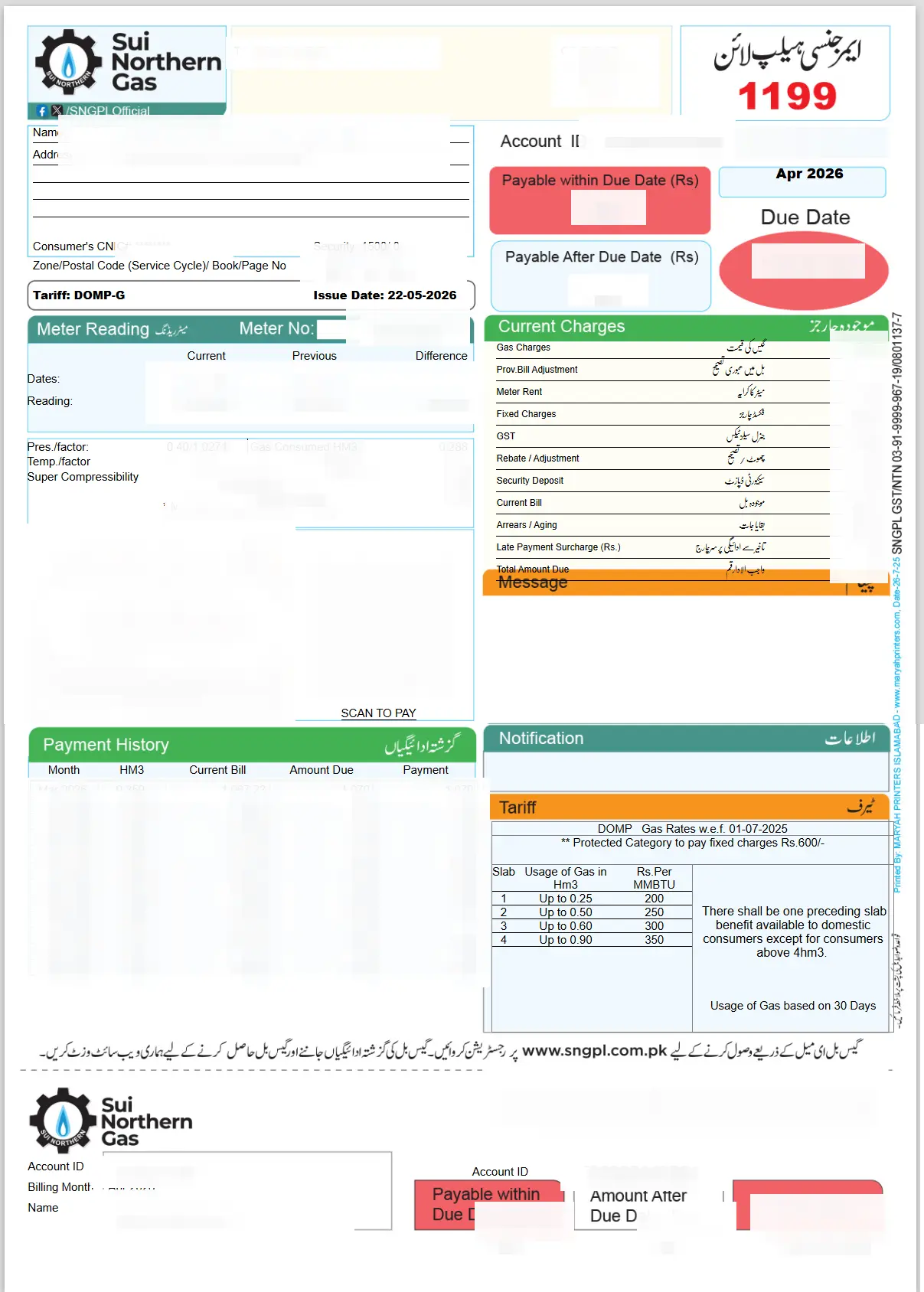
What to Check After the Bill Opens
Once the official bill page opens, review the bill month, payable amount, due date, previous balance, meter reading, and any taxes or fixed charges. This helps you tell the difference between a normal monthly charge and an older arrears or adjustment entry.
SNGPL Duplicate Bill Online Check
Once your bill opens, you can view the amount, due date, arrears, meter reading, and taxes. If you need a copy for your records, use your browser's print option and save the bill as a PDF.
After checking the amount, you may also want to read our gas bill payment methods guide so you know how to pay safely and what to do if a payment does not update immediately.
SNGPL Service Areas
SNGPL mainly serves Punjab, Khyber Pakhtunkhwa and Azad Kashmir, including cities such as Lahore, Islamabad, Rawalpindi, Faisalabad, Multan, Peshawar, Gujranwala, Sialkot and Sargodha.
If your connection is in Sindh or Balochistan, use the SSGC duplicate bill tool instead.
If Your SNGPL Bill Is Not Showing
If your bill does not load, first recheck the Consumer Number or Account ID. A single wrong digit can open nothing or show an error. Sometimes the official bill system may also be slow, especially near due dates, so retrying after a few minutes can help.
- Wrong Account ID: compare all 11 digits with an older bill and avoid spaces or dashes.
- Captcha not loading: refresh the official SNGPL page or try another browser.
- Official site slow: retry outside peak evening hours or near-due-date rush.
- Bill not generated yet: check again later in the billing cycle if the new month is not available.
If the problem continues, check an older bill to confirm the number and contact SNGPL through the helpline. For emergency numbers, complaint help and office guidance, use our Sui Gas helpline directory.
Using SNGPL Bill Check on Mobile
Enter your number and review it on the confirmation page, then select Open SNGPL Bill. Your official bill opens directly in a new tab. If it does not load, use the standard SNGPL form linked on the confirmation page and complete any verification it requests.
Why Your SNGPL Bill May Look Higher Than Expected
If your bill amount looks unusually high, your protected/non-protected category, fixed charges, winter usage average or billing adjustments may be involved. Our protected vs non-protected guide explains the category system in plain language.
New SNGPL Connection & Online Application
If you need to apply for a new gas connection or track an existing application, read our SNGPL new connection guide for a step-by-step walkthrough of the application process, required documents, and typical timelines.
Not looking for your bill?
For technical issues or gas leakage, please contact the SNGPL Helpline at 1199.
For billing inquiries, you can email billing@sngpl.com.pk.
Frequently Asked Questions
How do I check my SNGPL bill online?
Enter your 11-digit Consumer Number or Account ID in the SNGPL bill checker above, review your number, and select Open SNGPL Bill. The official bill opens directly at www.sngpl.com.pk in a new tab. Use the standard form link if the direct bill does not load.
Can I download my SNGPL duplicate bill?
Yes. After your bill opens, use your browser's print option and save it as a PDF, or print a hard copy if you need one for payment or records.
Which cities does SNGPL serve?
SNGPL serves many areas in Punjab, Khyber Pakhtunkhwa and Azad Kashmir, including Lahore, Islamabad, Rawalpindi, Faisalabad, Multan, Peshawar, Gujranwala, Sialkot and Sargodha.
What is www sngpl com pk online bill check?
It means checking your SNGPL bill on the official SNGPL website at www.sngpl.com.pk. This page helps you prepare the 11-digit Consumer Number or Account ID before opening the official bill portal.
What should I do if my gas meter is missing or faulty?
If you suspect your meter is faulty, damaged, or notice it is missing, contact SNGPL customer service at 1199 immediately. A faulty meter can lead to estimated or significantly higher billing.